

 Dementia Support Line
Real stories
People affected by dementia try out simple mobile phones
A group of people with dementia in Solihull look at two specially designed mobile phones.
We took two mobile phones from our online shop to show Solihull’s Dementia Voice Local Group. There are many of these groups around the country, meeting regularly to influence our and others’ work.
Both phones are designed to be simple to use for people with dementia and other conditions.
They also have features to help people to stay independent while keeping connected and safe.
Using a mobile when you have dementia
Almost every group member said they use mobile phones – all smartphones, with large touchscreens and a range of apps. However, they tend to use them for phone calls more than anything else.
‘If it rings I answer it, and I’ll call people on it,’ said Neil, ‘but that’s it.’
Jim said he doesn’t call other people very often, using his mobile mostly for incoming calls.
‘I can’t see the point of texting,’ said Paul. ‘You spend ages writing it and then see you’ve spelled it wrong!’
None of the group use their smartphones for social media or to browse the web. Many still use landline phones at home.
Some group members use their phones to take photos. Neil says,
It’s a record of things you’ve done. You can remember back to holidays.
Jim said he shares photos with family members using his phone, and Sally knows people who use their phone camera as a memory aid.
Howard admitted he’s lost confidence with his phone, and he wasn’t sure that any model would suit him now.
‘I’m not very good with the phone now,’ he said. ‘It gets on my nerves.’
Rachel noted that, even with simple devices, you still usually need to learn something new to use them.
‘It’s all about familiarity, isn’t it?’ added Paul. ‘And it’s annoying if you can’t learn it easily.’
Chatsie smartphone
Chatsie smartphone
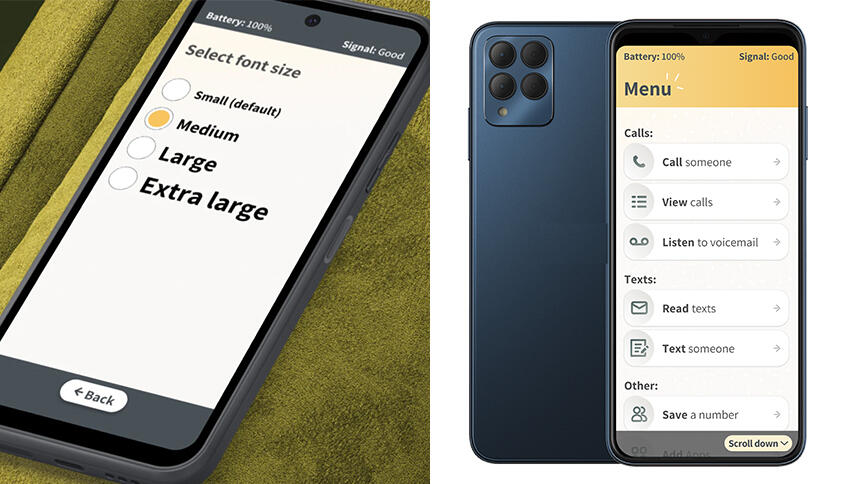
The Chatsie smartphone is designed to be quick to set up and intuitive to use.
Its screen uses a larger text size than any other smartphone. Its menus also have a bit more explanation, for example ‘Call someone’ instead of just ‘Call’.
But its remote support really sets it apart. If you need help with the phone, you can send a code to a trusted friend or family member, which they can use to access your phone’s settings through a website. There’s also a free support line.
Neil liked Chatsie’s simple and clear menus.
‘I like that,’ agreed Terry. ‘It’s a useful phone.’
Mervin thought it felt on the heavy side, though most of the group found its weight fine.
Terry said,
I really like that you can dictate a message and it will send it as a text.
Neil was pleased it can also send voice messages. It comes with a stylus pen as well, which some people would prefer to use on its touchscreen.
While most phones don’t come with written instructions nowadays, Chatsie has a booklet with clear pictures to help explain how to use it.
The group liked how clear and straightforward the instructions were, though Howard said he’d still struggle with them. Mervin added that he’d prefer it if someone read them out to him.
Chatsie costs £249.17 with VAT relief, which Terry thought is good value.
Jim said, ‘It sounds expensive, but all phones are now, aren’t they?’
Doro Leva X10 mobile phone
Doro Leva X10 mobile phone
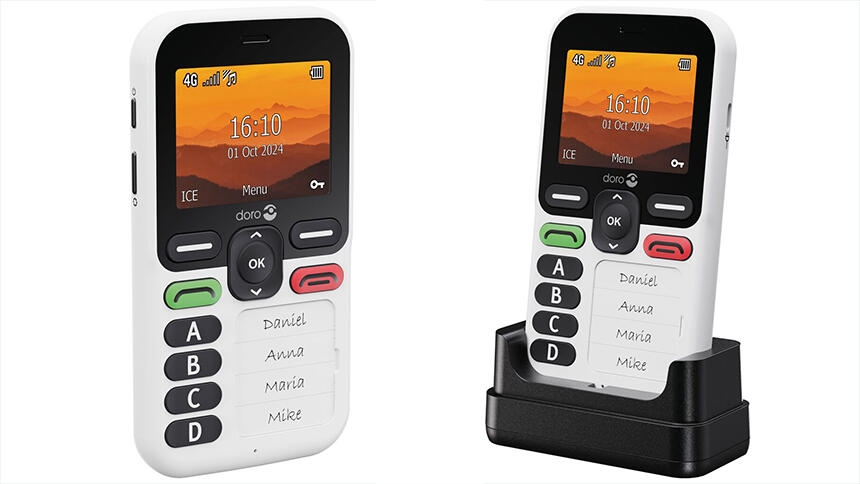
The Doro Leva X10 mobile phone only gives its user the most straightforward options to deal with in that moment. Anything more complex can be selected while it’s being set up.
It has a clear display with only minimal buttons – it doesn’t even have a number keypad. Instead there are four large speed-dial buttons, and you can write the names of who they’ve been programmed to call beside them. The buttons are raised so you can feel them easily.
Depending on what best suits the person using it, the phone can be set up to only call the four speed-dial numbers.
Alternatively, you can programme in many more contacts, which can be selected and called by scrolling through a menu.
Although Howard hadn’t at first thought a simpler phone could help him, he was impressed by the idea of only having four clearly labelled speed-dial buttons.
That would be helpful. It could have my daughter’s name and three grandsons. I’m a bit more interested now...
Terry, asking about scam calls, was glad to hear that you can also block all 0800 and 0300 numbers on the Doro Leva X10. Of course, many of these numbers are not scams!
The phone has an SOS button on its back. You can press and hold this to call and message up to three nominated ‘helpers’. As well as asking for help, these messages can also share your location with them.
At any other time, these nominated ‘helpers’ can also request your location to be shared with them by texting the phone with a code.
Although Paul liked the idea of a simple phone, he suggested you could also change the settings on your existing smartphone to make it much simpler to use.
The difference with the Doro Leva X10 is that it has very simple menus and there are fewer steps to do anything. It’s also harder to accidentally change settings or get lost among too many options.
Like Chatsie, this Doro phone comes with written instructions. Many group members found them less simple to use – Jim said they were wordy for him, and John thought the text was small.
‘I prefer visual aids,’ added Terry. Mervin thought that both the Doro phone and Chatsie seemed to be well made.
At a price of £124.99 with VAT relief, the group said they would recommend the Doro Leva X10 for people who’d benefit from its simplicity.
Prices (correct at June 2026):
- Chatsie mobile phone – white (new model) – £299.00 or £249.17 with VAT relief.
- Doro Leva X10 mobile phone – £149.99 or £124.99 with VAT relief.
You can buy these and many other specially designed products VAT free if they’re for use by a person with dementia or other conditions. To save 20% on these and many other specially designed products, tick the box stating you’re eligible for VAT relief at checkout.
Alzheimer’s Society shop
Visit our online shop for these and many other helpful products.